Review Notes
Select a sentence, press r, and say what you think of it. Press R to see
every note you have written across every file, and copy the lot as markdown to
paste into a chat with an AI, a pull request, or an email to whoever wrote it.
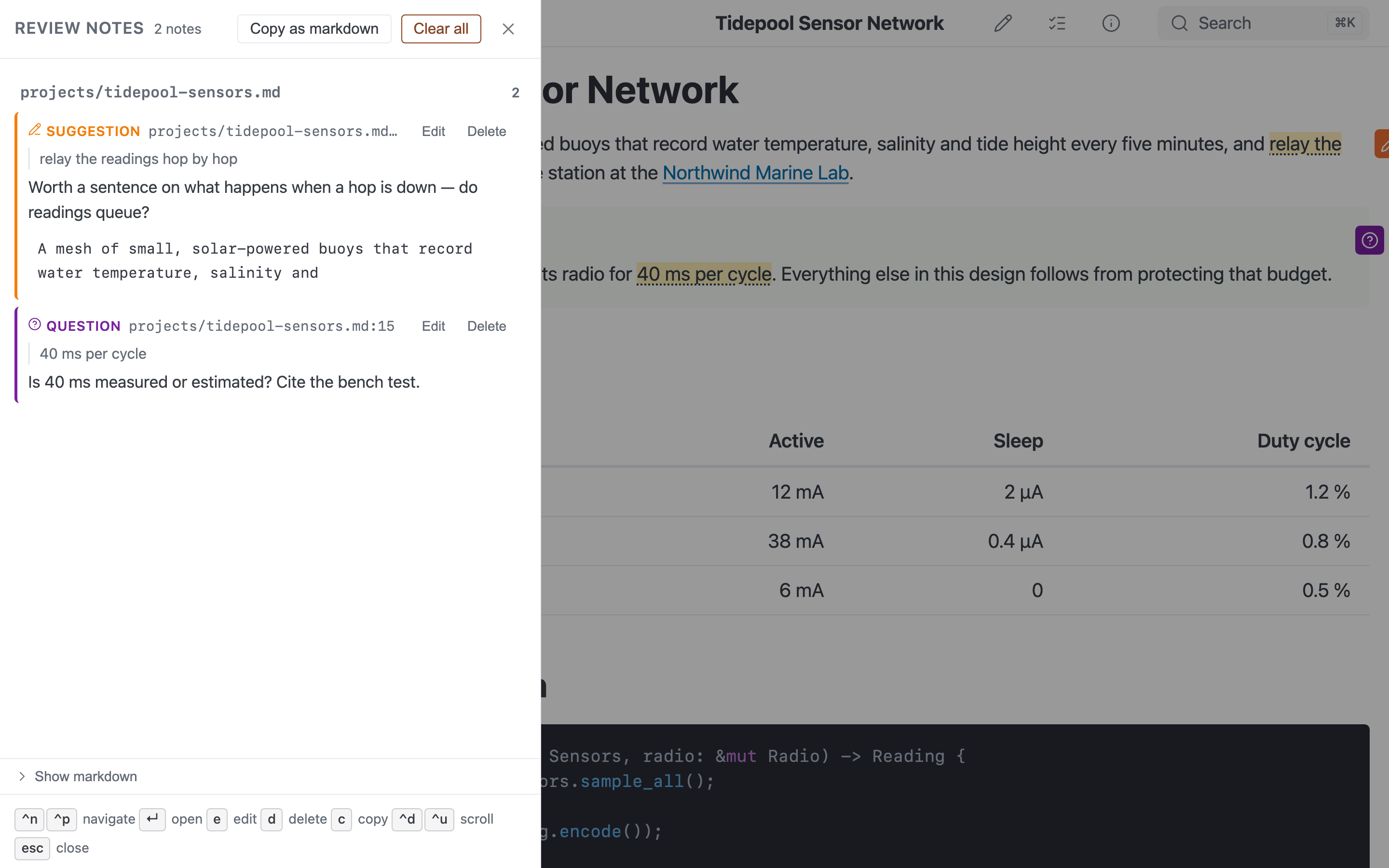
Review notes (R): every comment with its quote, ready to copy as markdown.
That last step is the point. mbr does not send your review anywhere, does not file an issue, and does not write to your files. It collects the comments and hands them back as one block of markdown that reads the same whether the recipient is a person or a coding agent.
Review notes are server and GUI only (
mbr -s,mbr -g). Notes anchor to thedata-mbr-lineattributes the renderer emits, which a static build never emits, so a built site has no review feature at all. See Applicability.
The export format is zmre/pwnvim’s (pwnvim/plugins/review.lua) — same six
types, same order, same markdown — so a review assembled here and one assembled
in the editor can be pasted into the same message.
The workflow
- Select some text in the rendered page. A small Add note button appears beside the selection.
- Press
r(or click the button). A form opens with the note type, a comment box, and — for a suggestion — the text to replace. - Save. A marker appears in the block the note belongs to, and a chat-bubble button appears in the bottom-right corner carrying the number of notes.
- Press
Rwhen you are done. The panel lists everything, grouped by file. - Copy as markdown and paste it wherever the review is going.
Pressing r with nothing selected writes a file-level note: a comment about
the document as a whole, with no line number. Those sort first within their file,
so they read as a preamble to the line-by-line comments.
A selection that lands somewhere with no source line to anchor to — a block the renderer does not tag, or a stale custom template — quietly degrades to a file-level note rather than refusing to open the form.
There is no button in the header
Deliberately. The entry points are r on a selection, R for the list, and the
floating button, which appears only once there is something to look at. The
header is already crowded with controls that are useful on every page; a review
button would be useful on the handful of pages where you are actually reviewing.
On a phone or in the iOS app, slide decks and flashcard pages put a floating play button in the same corner. The review button then stacks above it, and both stay clear of the home indicator.
The six note types
| Type | Marker | Label in the export | Meaning |
|---|---|---|---|
| Issue | ⚠ | **[ISSUE]** | Problems to fix |
| Suggestion | 💭 | **[SUGGESTION]** | Improvements |
| Note | 📝 | **[NOTE]** | Observations |
| Praise | ✨ | **[PRAISE]** | Positive feedback |
| Question | ? | **[QUESTION]** | Clarification needed |
| Insight | 💡 | **[INSIGHT]** | Useful observations |
New notes start on Note. The order above is pwnvim’s, and it is the order of the dropdown, of the marker colours, and of nothing else — notes are sorted by file and line, never by type, so a review reads in document order.
The exported label is just the type uppercased. Nothing parses it on the way back in; it is there so a human or a model skimming the review can see at a glance which items are blocking and which are compliments.
Suggestions carry replacement text
Choosing Suggestion adds a second, editable box prefilled with the source
lines you selected. Whatever you leave in it is exported inside a
```suggestion fence:
2. **[SUGGESTION]** `flake.nix:26`
   Pin this to a release tag.

   ```suggestion
   inputs.nixpkgs.url = "github:NixOS/nixpkgs/nixos-25.05";
   ```
That tag rather than a bare fence or a diff, because it is the one GitHub’s review UI and every coding agent already understand — so the export does something at the far end instead of merely describing itself.
A suggestion is the one type that may be saved with an empty comment: the replacement text is the comment.
In the document
Each anchored note leaves a small coloured marker in the block it belongs to,
with the note itself in a popover on hover or keyboard focus. The shape is the
>>> marginalia you already have, on purpose — it is the same idea, and it
should not look like a different feature.
The quoted text itself gets a faint wash. That wash is painted with the browser’s Custom Highlight API and inserts nothing into the page, so it cannot disturb find-in-page, copy-and-paste, or any other enhancement that reads the document’s text. A browser without the API loses the wash and keeps every marker.
The popover has Edit and Delete buttons. Delete asks first — there is no undo anywhere in this feature.
Markers carry an id, so #mbr-review-<id> is an ordinary fragment link that
scrolls to a note and focuses it. That is how the panel gets you there.
The review panel
R opens the list: every note in the store, grouped under a heading per file,
in file-then-line order.
Activating a note on the page you are already reading scrolls to its marker; activating one on another page navigates there and lands on the marker. The same-file case deliberately does not reload — the panel is usually an overlay on the very document the note is about.
Copy as markdown puts the whole review on the clipboard. The same text is also
sitting in a read-only box in the panel, which is not decoration: the clipboard
API is unavailable on a non-secure origin (mbr -s --host 0.0.0.0 reached by IP,
for instance), and a copy button that silently did nothing there would lose the
entire review. A failed copy expands that box and selects it, so ⌘/Ctrl+C
finishes the job.
Clearing a review
Clear all in the panel header deletes every note, in every file — not just
the ones on screen, and not just the current file. It asks first, naming the
count, and Esc or Cancel backs out.
There is no undo, and the notes exist only in this browser, so copy the review out before clearing if it is worth anything. mbr deliberately does not copy it for you: that would replace whatever is already on your clipboard, and it would make clearing fail on the non-secure origins where the clipboard API is absent.
The button is hidden entirely when there is nothing to clear, and when the store was written by a newer version of mbr than the one you are running (see Where notes live).
Keyboard
| Key | Action |
|---|---|
r | Add a note, anchored to the selection |
R | Open the panel |
Ctrl+n / Ctrl+p, ↓ / ↑ | Move between file headings and notes |
Enter | Open the focused note |
e | Edit the focused note |
d | Delete the focused note — press d again to confirm |
c | Copy the whole review as markdown |
Ctrl+d / Ctrl+u | Scroll the list half a page |
Ctrl+f / Ctrl+b | Scroll the list a full page |
Esc | Back out of a clear-all confirmation, then close the edit form, then the panel |
There is deliberately no shortcut for Clear all. Every other key here
affects one note, which a second r can replace; that one destroys the whole
review, and a key within reach of a typo is the wrong affordance for it.
d arms and a second d fires, rather than a modal confirmation: a note deleted
on one keypress is one fat finger away from a comment you cannot get back. Moving
off the row disarms it.
Bare letters yield to whatever you are typing in. While the form is open, or the
focus is in a text field, e, d and c are literal characters and the panel
does not claim them.
Where notes live
Notes are stored in your browser’s localStorage, under a key derived from
mbr_review_notes and the served repository. Nothing is written to your
markdown files and nothing is sent to the server.
That buys the thing the feature needs most: durability across a re-render. Fix a typo in the file you are reviewing, let live reload redraw the page, and your notes are still there. Navigate to another file and back, same. Two windows open on the same repository see each other’s notes, because every write is a read-modify-write against storage rather than a write of a cached list.
And it is a real limitation, not a detail:
- The review lives in one browser on one machine. It does not follow you to another laptop, another browser, or a private window.
- Clearing site data deletes it. So does any “clear cookies and site data” sweep, and so does a browser configured to clear storage on exit.
- It is scoped to origin and repository together, not just the origin.
Serving two different repos from
127.0.0.1:5200at different times keeps their notes in separate stores, but the scoping key is derived from the server’s root directory, not a repository identity: point mbr at the same folder under a different path (or a clone) and it looks like a different repository to the store. - Nothing is backed up. There is no undo.
Copying the review out is what makes it portable, and it is worth doing before you close the tab rather than after. A note is capped at 8,000 characters of comment and 8,000 of suggestion, with a 400-character quote, so a store of even a large review is small.
If a newer version of mbr wrote the store, this one refuses to write to it and says so in the panel — overwriting an envelope whose fields it cannot see would silently drop them. Reading, listing and copying all still work.
When the document changes underneath a note
Every note remembers a quote of the text it was attached to. On every page load mbr looks for that text again and updates the note’s line to wherever it now is. Editing the file above a note, or saving through the WYSIWYG editor (which re-serializes the whole document), therefore does not leave the note pointing at the wrong sentence.
| What mbr found | What happens | Shown as |
|---|---|---|
| The quote, at the same line | Nothing to do | — |
| The quote, somewhere else | The note’s line is updated | moved |
| Only the first 60 characters of the quote | The note’s line is updated | moved |
| Nothing | The note keeps its last known line | text not found |
A note is never deleted by this. Staleness is a badge, not a deletion — the text you were commenting on may have been cut precisely because of the comment, and that comment is still the most useful thing in the review.
The search runs against the rendered page, so it needs no network and works on a
server started without --edit. It matches the quote verbatim, and falls back to
its first 60 characters only when the whole thing is nowhere to be found: an edit
that changed the start of a sentence changed what the note was about, and
should read as lost rather than be dragged somewhere plausible.
The --edit caveat for suggestions
The suggestion box is prefilled from the file’s source lines, read from
/.mbr/raw — which sits behind the same access check as editing. On a server
started without --edit that endpoint answers 403, so the box is
prefilled from the rendered text instead and says so underneath:
Prefilled from the rendered text — the file’s source isn’t readable (start mbr with
--edit).
Rendered text is usually close enough to edit into a replacement, and it is
exactly what you would have had by hand. Nothing else about review notes depends
on --edit: writing, editing, deleting, re-anchoring, marker rendering and the
export all work on a plain mbr -s.
The difference matters when the source and the rendering diverge — a line containing a wikilink, a footnote reference, or a table’s pipes will not come back through the rendered text the way it appears in the file.
The export format
# Code Review

1. **[SUGGESTION]** `flake.nix:26`
   Pin this to a release tag so a rebuild is reproducible.

2. **[NOTE]** `docs/PLAN.md:15-18`
   These four steps assume the migration already ran. Worth saying so.

3. **[QUESTION]** `docs/PLAN.md`
   Is this plan still current, or has it been superseded?
- Items are numbered continuously across files, with no per-file headings — the number is how a reader refers to an item in conversation, and restarting it per file would make “item 3” ambiguous. (The panel groups by file; the export does not.)
- The location is
file,file:line, orfile:line-endLine, in a code span. It is the repo-relative source path with its extension, not the URL, because the reader on the other end has to open the file — anddocs/index.mdis served at/docs/. - The body is indented three spaces. Continuation lines and suggestion fences use the same three regardless of the item’s number.
- Order is file path, then line, then the note’s age. File-level notes sort ahead of the line notes in their file.
The panel’s on-screen order and the copied order are the same sort, so the numbers you read out match the ones on your screen.
Turning it off
| How | Effect |
|---|---|
mbr -s --no-review ~/notes | For this run |
review_enabled = false in .mbr/config.toml | For this repository |
MBR_REVIEW_ENABLED=false | For this environment |
Any of these stops the renderer emitting data-mbr-line, which takes the whole
feature with it: no r, no R, no markers, no floating button. Notes already in
localStorage are left alone and come back if you re-enable it.
See Review Settings for exactly which elements carry the attribute and what it costs, and the CLI Reference for the flag.
Why not in static builds
An anchor of the form file.md:26 is only meaningful against a live file that
somebody can be asked about. mbr -b, the CLI (mbr file.md) and the macOS
QuickLook preview therefore never emit source lines at all — not as a
configuration choice but unconditionally, so review_enabled has no effect on a
build and a built page reports the feature as off.
The practical consequence: review a repository from mbr -s or mbr -g, not
from its published site. The review chunk is excluded from static output
entirely, so the pages you publish carry none of its weight.
Cost when you do not use it
Nearly nothing. The panel and the form are a separate ~15 kB (gzipped) bundle that is fetched the first time you write a note or open the list, and never before. The main bundle carries only the two shortcuts, the selection watcher and the marker layer, and the marker layer does no work at all on a page with no notes on it.
The data-mbr-line attributes themselves are a handful of bytes per block, on
served pages only.
See Also
- Keyboard Shortcuts —
r,Rand the panel - In-Browser Editing —
--edit, and what it unlocks for suggestions - Review Settings — which elements
carry
data-mbr-line - CLI Reference —
--no-review