Flashcards
Give a note type: flashcard in its frontmatter and every definition list in it
becomes a deck: each term is the front of a card, its definitions are the back.
A Review button (a card stack) appears in the header — or press p — and the
cards open full screen, one at a time, to flip through in order, at random, in a
growing Concentric (FSRS) stack, or with
spaced repetition.
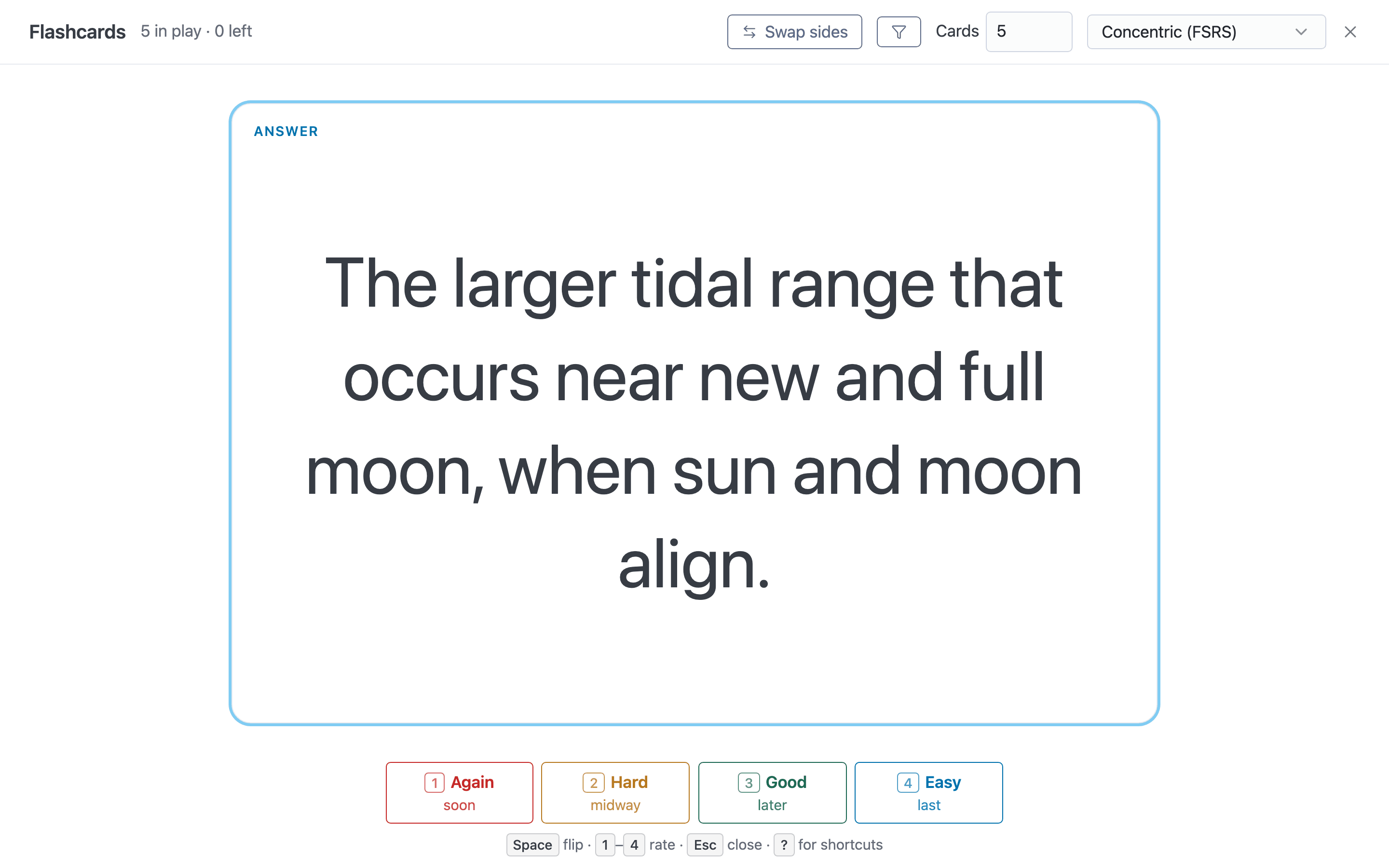
The deck overlay after flipping a card, in Concentric (FSRS) mode.
On phones (600px wide or less) and in the iOS app, a floating card-stack button in the
bottom-right corner starts the deck instead of the header button. On a page that
is both slides and a deck, it starts the slides, the same as p.
This page is itself a deck. The cards at the bottom are
real: press p to try them.
Why definition lists?
We wanted to be compatible with an established markdown flashcard format, and looked at Neuracache, kanad13/markdown-flashcards, bttger/markdown-flashcards and Mochi. None was a good model: they want a note per flashcard, or HTML comments, or special one-off syntax.
The core requirement is that notes with flashcards stay nicely readable as text and render nicely in most places by default — in an editor, on GitHub, in other markdown tools — with anything extra being enhanced styling rather than syntax that mucks up the text. A definition list is exactly that: a term followed by its definitions is already “a question and its answer”, it is supported by most markdown renderers, and it reads naturally as plain text. mbr only adds behaviour on top.
Writing cards
---
type: flashcard
---

What is the capital of France?
: Paris.

Which two fields set a page's body classes?
: `style`
: `type`
- The term is the front; every
:line under it is part of the back. Several answers are shown together, one after another. - Answers can hold anything markdown can: lists, code blocks, images, math, links. Indent continuation lines to line up with the answer’s text.
- Leave a blank line before the next term. Without one, the next question is swallowed into the previous answer as a lazy continuation — the same definition-list gotcha as anywhere else. (The one exception is an answer ending in a code block, which has no paragraph to continue. A question right after one is a separate card, and when mbr records a review above it, it adds a blank line so the question stays separate.)
- Only top-level definition lists are cards. A list nested inside a block quote or a list item is left out of the deck.
- Tight (no blank lines) and loose (blank line between the term and its
:lines) lists both work.
Multi-line questions
A question can span several consecutive lines, but markdown joins them into
one run of text. To keep each line on its own line, end it with a backslash
(\). A line holding only a backslash gives you a blank line inside the
question, which is handy for setting multiple-choice options apart from the
question itself:
Which of the following is part of the Basis and Purpose of the Amateur Radio Service?\
\
A. Providing personal radio communications for as many citizens as possible\
B. Providing communications for international contesting\
C. Advancing skills in the technical and communication phases of the radio art\
D. All these choices are correct
: D
Don’t use a truly empty line instead. A blank line ends the question: the lines above it become an ordinary paragraph outside the deck, and only the lines after it become the card’s front. A question can’t hold real blocks such as a markdown list either — only answers can.
In the page itself, a flashcard note keeps mbr’s usual FAQ-style definition lists: the answers stay hidden until you click a question, which is a natural way to quiz yourself without opening the deck at all.
Reviewing
The overlay shows one card at a time, sized to fill the screen: the text is set
as large as it can be while still fitting (and scrolls once it would be too
small to read). Click the card, or press Enter, to flip it.
The top bar has the progress counter, a Swap sides toggle (show the answer first and recall the question), the section filter when the note has headings, the Cards box in Concentric mode, the mode, and the close button.
| Mode | Order | On the back of a card | Needs editing on |
|---|---|---|---|
| In order | As written | Next / Previous | No |
| Random | Shuffled each time | Next / Previous | No |
| Concentric (FSRS) | A small stack that grows as you learn it | Rate it: 1 Again, 2 Hard, 3 Good, 4 Easy | No (ratings are saved only when it is) |
| Spaced repetition (FSRS) | Due cards first, then new ones in random order | Rate it: 1 Again, 2 Hard, 3 Good, 4 Easy | Yes |
The deck always opens in Concentric (FSRS), with editing on or off; pick another mode from the menu or with its key (below).
Keys
Everything in the deck works from the keyboard. Press ? in the deck for a
list of every key; the hint line at the bottom says so. The navigation keys
mirror the ones slides use, so the same fingers work in both.
Navigation
| Key | Action |
|---|---|
p | Open the deck (on a flashcard page) |
Space / → / PageDown / n | Advance: flip a card that shows its front; on the back, go to the next card |
Enter / click | Flip the card either way |
← / PageUp | Previous card (In order / Random) |
Home / End | First / last card (In order / Random) |
Rating (Concentric and spaced repetition, on the back of a card)
| Key | Action |
|---|---|
1 | Again |
2 | Hard |
3 | Good |
4 | Easy |
Deck controls
| Key | Action |
|---|---|
c | Switch to Concentric (FSRS) |
o | Switch to In order |
r | Switch to Random |
s | Switch to Spaced repetition (FSRS); ignored when it is not offered |
w | Swap sides (show the answer first) |
f | Open the section filter with focus on its first box (when the note has one). Inside it: ↑ / ↓ (or Tab) move, Space ticks, a picks All sections, Esc or f closes it and puts focus back |
+ / = | One more card in play (Concentric; same as raising the Cards box) |
- | One fewer card in play (Concentric) |
# | Put the cursor in the Cards box (Concentric). Type a number; Enter applies it, Esc leaves it unchanged, and both return to the card |
? | Show or hide the list of shortcuts (Esc also closes it) |
Esc | Close the shortcut list, the Cards box or the section filter if one is open; otherwise leave the deck and return to the page |
A mode key for the mode you are already in does nothing, so it cannot lose your
place. While the deck is open the page’s own shortcuts are switched off, and keys
held with Cmd, Ctrl or Alt are left alone, so browser shortcuts such as
printing still work.
In the rated modes (Concentric and spaced repetition) a card can only be left
by rating it, so on the back Space and → do nothing except point at the
rating buttons — a stray key cannot skip a card you were meant to grade, and
there is no going back. Rating a card (by key or click) moves straight on to
the next. Keys typed into the Cards box or the filter stay there.
Concentric (FSRS)
Concentric (FSRS), the deck’s default mode, drills a small stack of cards, folds in new ones as you come to know it, and puts away the ones you find easy — so the stack grows outward in rings, like concentric circles. It is closely related to Incremental Rehearsal, also called folding-in (Tucker 1988, unpublished teaching materials, often cited as Tucker 1989), a drill technique from special education where unknown items are worked one at a time into a set that is mostly known. A meta-analysis of 19 Incremental Rehearsal studies by Burns, Zaslofsky, Kanive and Parker found large effects on learning, though no clear efficiency advantage over other drills (Burns et al. 2012; overview at Intervention Central). It needs no editing: it works on a static site too.
How it runs:
-
Starting stack. Six cards (or every card, if the note has fewer). If the note has any review history, a quarter of the stack, rounded up, is seeded with challenging cards: first ones whose latest rating was Again or Hard, then ones never reviewed. The rest are random. A note with no history at all starts with a plain random six.
-
Rate each card. The card goes back into the stack at a position that depends on the rating, with a little jitter, but never sooner than a minimum number of other cards:
Rating Goes back… Earliest return Again about a quarter of the way in (20–35%) after 3 other cards Hard about halfway (40–60%) after 4 other cards Good near the back (75–100%) after 4 other cards Easy to the very back — In a stack too small for the minimum, the card goes to the very back.
-
Grow. After every rating the deck counts the cards it treats as known: those whose latest rating in this session is Good or Easy. A card not yet rated this session does not count, whatever its history says, so a stack never looks learned before you have seen it. While at least 70% of the stack is known, one new card is folded in at a random place (never the card on screen) and the share is checked again. A new card is unrated, so each one lowers the share: with six cards, the stack grows as soon as five are known (5 of 6 is 83%; 5 of 7 is 71%, so a second card comes in; 5 of 8 is 62%, so it stops at eight). Six of six known at once would grow it to nine.
-
Discard. A card you rate Easy twice in a row in this session is discarded: it leaves the stack, goes back to the pool, and one card from the pool takes its place. “In a row” counts that card’s own ratings — any other rating of it starts the count over, and earlier sessions’ history does not count. With nothing in the pool to swap in, the stack gets one card smaller. Good never discards a card.
-
Which cards come in. Growth, swaps and raising the Cards box take cards from the pool in this order: latest rating (history or this session) Again or Hard, then never rated, then Good, then Easy — at random within each group. Discarded cards come last: a swap or a bigger Cards box brings one back only when nothing else is left, growth never does, and a card that comes back starts its Easy count over.
-
Toast. When a rating folds cards in or discards one, a small note next to the counter says so for a moment:
+2for two cards folded in,−1 +1for a swap,−1 +2for a swap that also grew the stack. Screen readers hear it as “1 card discarded, 2 added”. With reduced motion it appears and disappears without animating. -
Mastered. When there is nothing left to fold in (every card is in the stack or discarded) and every card in the stack is known, the deck says so and offers Keep practising (the same stack carries on) or a new stack. It says so on the rating that gets there, not on every rating after it; a miss that undoes it and a later rating that restores it will say so again. Otherwise Concentric never ends on its own — close it whenever you like.
The Cards box in the top bar shows the stack’s size and follows it as it
grows. Change it at any time: raising it adds cards in the order above,
lowering it sends the cards you know best back to the pool (Easy before Good
before not yet rated, never the card on screen). A stack thinned by discards
keeps the size you chose in the box. The counter reads 8 in play · 4 left:
cards in the stack, and cards still to be folded in. Once any card is discarded
it adds · 1 discarded; discarded cards are not counted as left.
Saving. With editing enabled, every Concentric (FSRS) rating is
written to the card’s review history exactly as a spaced
repetition rating is, so practice counts toward FSRS scheduling later. Without
editing — a static site, a read-only server — ratings last for the session only:
they steer the stack but nothing is written. If a write fails, the deck says so
and the rating still counts for the session. When the note changed on disk (or
on another device), the deck offers to reload the page for the latest version;
if you stay, it stops writing and carries on session-only. A page reached under a hostname
the server will not take edits from (behind tailscale serve or a reverse proxy,
with no edit token configured) is rendered with editing
off, so its ratings are session-only from the start; to save reviews there,
configure an edit_token_hash (mbr --generate-edit-token). Should a write
still be refused (403, e.g. the server restarted without --edit under an
open page), the deck stops writing without a notice — except in spaced
repetition, which says so once. Any other failure (a missing
edit token, the server unreachable) is retried with the
next rating, so saving resumes as soon as it can. Spaced repetition instead
keeps the card on screen after such a failure, so the same rating can be
retried.
The growth threshold is configurable with
flashcards_concentric_threshold
(default 0.7).
Where the numbers come from
- Six cards to start. Working memory holds only about four chunks at once (Cowan 2001); six keeps the challenging cards few enough to hold in mind while the rest of the stack, mostly known, gives each of them a gap between repetitions.
- A 70% bar. Incremental Rehearsal works by keeping most of the drill set known, with only a few unknown items in it at a time, and a meta-analysis of drill ratios found strong effects whenever at least half the items were known (Burns 2004); growing only while most of the stack is known keeps it in that range. For comparison, a theoretical model of learning puts the optimal success rate near 85% (Wilson et al. 2019, a result derived for gradient-descent learners on binary classification tasks rather than measured in a classroom). 70% is a little looser, so a stack grows steadily instead of stalling on one stubborn card.
- One card at a time, as soon as the bar is met. Folding-in introduces unknown items one at a time into a set that is mostly known — Incremental Rehearsal itself runs at about 90% known — and Burns’s meta-analysis found strong effects at any ratio of at least half known. Checking after every rating grows the stack the moment it is ready, rather than at the end of a round, and adding one card before checking again keeps new cards a small share of it. The stack does have to grow: a small stack spaces its repetitions too closely, drilling a few cards over and over masses their practice, and one large stack, with more cards between each repetition, beats several small ones (Kornell 2009).
- Where a card goes back, and the minimum gap. Delaying the first retrieval matters more than how later ones are spaced (Karpicke & Roediger 2007), so a card you missed is never shown again straight away. A harder retrieval at a longer lag strengthens memory more, provided it still succeeds (Pyc & Rawson 2009): Again comes back soon enough to be recalled, but only after at least three other cards, and Hard one card later than that; Good and Easy wait longest, and Good never sooner than Hard, so a small stack keeps that order. Incremental Rehearsal does the same, lengthening the gap before an unknown item returns by one known item each time round.
- Discarding after two Easy ratings in a row. Incremental Rehearsal’s own procedure puts the most recently added known item away as each new one comes in, keeping the ratio (Intervention Central). But dropping an item from testing after one correct recall sharply cut what was remembered a week later (Karpicke & Roediger 2008), which is why it takes two Easy ratings and why Good never discards a card. About three correct recalls during initial learning, plus relearning in later sessions, gave the most durable learning for the time spent (Rawson & Dunlosky 2011); two Easy ratings, each sending the card to the back of the stack, sit close to that, and with editing on the saved ratings let FSRS schedule the relearning. Learners left to decide drop cards too early (Kornell & Bjork 2008), so discarding is a fixed rule rather than a button. Discarded cards go back to the pool at the lowest priority, so they return once everything else is in play.
- Struggled cards first. When cards are picked from the pool, the ones you missed last time come first and never-reviewed ones next, for the same reason the starting stack is seeded with them (below): they need the practice most.
- A quarter challenging. Seeding a quarter of the stack with cards you struggled with (or have never seen) makes sure they get practice, while three quarters stay cards you are likely to know. That is looser than Incremental Rehearsal’s seven to nine known items per unknown, but within the range of mostly-known ratios that worked well in Burns’s 2004 meta-analysis. Only the start is seeded this way; picking the whole starting stack in priority order would fill it with every struggled and new card.
Filtering by section
When the note’s cards sit under two or more headings, the top bar has a funnel button. It opens a list of the headings that contain cards, indented by level; tick one or more to review only the cards under them. A heading includes everything under it, subheadings too. With nothing ticked (All sections), every card is in the deck, and the funnel shows a dot while a filter is on. A heading that holds every card in the note is left out, since it would filter nothing.
Changing the filter restarts In order and Random on the chosen cards, re-plans a
spaced-repetition session over them, and in Concentric swaps cards in and out
of the stack while keeping its size. Esc or a click elsewhere closes the
list. The filter is not remembered: each time the deck opens it starts on every
card.
Progress in the page
Once a note has any review history, the page itself shows how it is going:
- Each reviewed question gets a thin left border in the colour of its latest rating (red Again, amber Hard, green Good, blue Easy). Hover it to see when: Last review: Easy, Oct 9.
- Each heading with cards under it gets a small pie chart of its cards’ latest ratings, with never-reviewed cards as a grey slice. The note’s title shows the whole note. Hover a pie for the breakdown, e.g. Easy 40% · Good 20% · Hard 10% · Again 20% · Not reviewed 10% (10 cards).
The pies are drawn without any text, so selecting or searching a heading finds
only its words. After a deck session that saved reviews, the borders and pies
redraw when the deck closes. A note with no history shows neither. Turn them
off with
flashcards_progress_indicators = false.
Spaced repetition (FSRS)
Spaced repetition shows each card again just before you would forget it, so easy cards come back rarely and hard ones often. mbr schedules with FSRS, the Free Spaced Repetition Scheduler that modern Anki uses, through the ts-fsrs library. The four ratings mean what they mean in Anki:
| Rating | Meaning |
|---|---|
| Again | You did not remember it |
| Hard | You remembered, with real effort |
| Good | You remembered after a moment’s thought |
| Easy | You remembered instantly |
Each button shows when the card would come back, e.g. 1m, 10m, 3d.
A session shows the cards that are due first — the ones you are most likely to have forgotten first, with ties broken at random — and then the cards you have never reviewed, shuffled, so a note with little history does not open on its first card every time. A card you rate Again (or a new card still in its first minutes-long learning steps) is shown again later in the same session rather than in ten minutes’ time, like Anki’s “learn ahead”. When nothing is due, the deck says when the next card is, and offers to review at random anyway.
Scheduling uses FSRS’s default parameters (90% target retention, 1-minute and 10-minute learning steps, a 10-minute relearning step) with fuzz off, so the same history always produces the same schedule.
When it is available
Spaced repetition has to write your results somewhere, and mbr writes them into
the note itself — so it is offered only when the page is served with
editing enabled (mbr -s / mbr -g with editing on). A
static site, or a server without editing, still offers Concentric (FSRS) —
session-only, nothing saved — In order and Random. On
this documentation site, which is a static build, the mode is not offered.
The deck finds each card in the file by its question’s source line, which the
page carries as data-mbr-line. That attribute also serves
review notes, but turning those
off with --no-review does not take spaced repetition with it: with editing on,
questions keep their line and nothing else on the page gets one.
The review history
Each rating is appended to the card as one more definition:
What is the capital of France?
: Paris.
: ___Review History___
  * 2026-10-06 13:45 - Again
  * 2026-10-06 13:55 - Good
  * 2026-10-07 09:10 - Hard
  * 2026-10-09 18:02 - Easy
- The history is the definition whose text starts with the emphasised words
Review History (
___Review History___is what mbr writes;**Review History**and*Review History*are recognised too, in any case). It is never shown as part of the answer. - Each line is
YYYY-MM-DD HH:MM - Rating, with the rating one ofAgain,Hard,GoodorEasy.Failis accepted as another word forAgain, for history written by other tools; mbr always writesAgain. Lines in any other shape are ignored by the scheduler and left untouched. - Nothing else is stored. Every time the deck opens, each card’s FSRS state is recomputed by replaying its history, so editing or deleting history lines by hand is perfectly fine.
- In the page, the history collapses to a single line such as Reviewed 4× · last: Easy, Oct 9; click it to see the entries. (In the deck, History on the back of a card shows the entries and the card’s current due date, stability and difficulty.)
Each entry is stamped with your device’s clock when you rate the card, and the
server writes only that line (plus the ___Review History___ line the first
time), keeping the file’s line endings.
If the note changed on disk since the page loaded, nothing is written and the
deck offers to reload the page; reload to continue saving. The endpoint is
POST /.mbr/flashcard-review.
Times are your local wall-clock time, without an offset, and are read back in the browser’s time zone — so it does not matter where the server runs. The server refuses a time more than a day or so from its own clock, which catches a badly set device clock. Reviewing while travelling across time zones writes entries in whichever zone you are in, which can nudge a day boundary slightly; that is the price of history a human can read at a glance.
The demo deck
A small deck about mbr, markdown and general knowledge. Press p, or click a
question to peek at its answer. The two headings below are there to try the
section filter and the progress pies.
mbr and markdown
- What does mbr stand for?
- Markdown browser.
- Review History
- 2026-10-06 20:59 - Easy
- Which key opens search in mbr?
/(slash).- Review History
- 2026-10-06 20:59 - Good
- How do you write a markdown link to example.com with the text “Example”?
-
[Example](https://example.com) - Review History
- 2026-10-06 21:00 - Easy
- Which two frontmatter fields set a page’s
<body>classes? styletype- What are mbr’s three main jobs?
-
- A previewer that renders markdown on the fly
- A browser for navigating, searching and tagging a whole repository
- A static site generator
- What does the mbr logo look like?

- What does FSRS stand for?
- Free Spaced Repetition Scheduler.
- How do you start a fenced code block in markdown?
- A line of three backticks (or three tildes), optionally followed by a language name.
- In a definition list, what does a line starting with
:mean? - It is a definition — on a flashcard page, an answer — of the term above it.
General knowledge
- What is the capital of Australia?
- Canberra.
- Review History
- 2026-09-14 08:12 - Again
- 2026-09-14 08:24 - Good
- 2026-09-17 19:40 - Good
- 2026-10-06 20:59 - Again
- What is the chemical symbol for gold?
- Au, from the Latin aurum.
- Review History
- 2026-09-20 21:03 - Fail
- 2026-09-20 21:15 - Hard
- 2026-10-06 20:59 - Easy
- Which planet has the shortest day?
- Jupiter — it turns once in about 9 hours and 56 minutes.
- How many bits are in a byte?
- Eight.