Contacts
A note with type: person or type: organization is a contact. It is still
just a markdown note — your own words about someone, in a file you own — but mbr
reads a few well-known frontmatter fields and renders them as a contact card
at the top of the page: avatar, name, role, phone numbers, email addresses,
websites, postal addresses and dates.
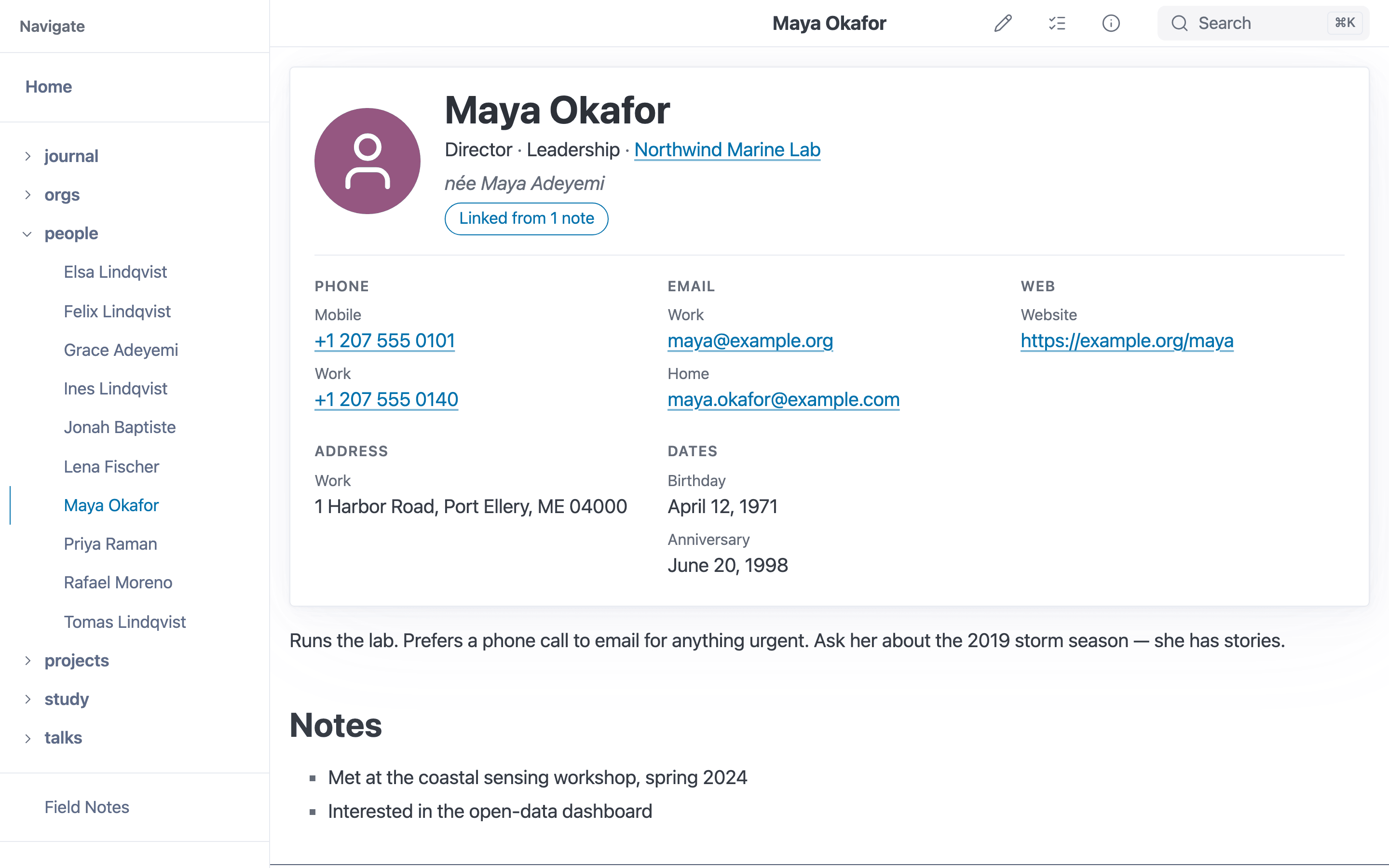
The contact card at the top of a type: person note.
---
type: person
title: Jane Doe
company: "[[Acme Corp]]"
job_title: VP Marketing
emails:
  work: jane@abc.com
phones:
  - mobile: "+1 303 555 0100"
dates:
  birthday: 03-19
---

Met Jane at the 2019 conference. Loves sailing.
Every field is optional. A contact with none of them still gets its name and an avatar; a field that is absent simply leaves its section off the card.
The field names were chosen to map cleanly onto vCard, Apple Contacts and Google Contacts (see Compatibility), so a future sync tool can round-trip them without guessing.
With editing on, the editor’s Properties form offers these fields on
personandorganizationnotes, with label suggestions and a partial-date picker. See Editing Properties.
Names and the headline
| Field | Purpose |
|---|---|
title | The headline. Always wins when present. |
prefix, first_name, middle_name, last_name, suffix | Name parts. A person without a title is headlined “prefix first middle last suffix” from whichever parts exist. |
company | An organization without a title is headlined by its company. |
aliases | Other names — see Aliases. |
image | Portrait or logo. A relative path resolves from the note’s folder, like an image in the body. Without one, the card shows a person or building silhouette (tinted by gender on people). |
gender | Free text; used by the genealogy charts and to tint the default avatar. |
The card’s name is the page heading: mbr does not also print the generated
<h1> above it. If the note body starts with its own # Heading, that heading is
kept and the card leaves its name off, so the name never appears twice.
Work
| Field | Purpose |
|---|---|
company | Plain text, or a [[wikilink]] to an organization note. |
department | Plain text. |
job_title | Plain text. |
They are shown together under the name: VP Marketing · Marketing · Acme Corp.
Company links
When company is a wikilink — company: "[[Acme Corp]]" — and it resolves to a
note (by title, alias or filename, exactly like a relationship endpoint), two
things happen:
- the company name on the card links to that note, and
- the person gets an
employerrelationship to it, and the organization anemployeerelationship back. Both are marked derived (implied by a field rather than written inrelationships:), and they feed the org chart like any other edge.
Plain text (company: Acme Corp) never creates an edge, even if a note happens
to be titled “Acme Corp” — auto-linking free text would invent relationships you
never asked for. A wikilink that resolves to nothing is shown as text and
reported like any other unresolved relationship endpoint. The implied edge needs
an employer type in the registry; it is a built-in default, but a repository
that replaces relationship_types must keep it (see
Relationships).
Labeled fields: phones, emails, web, addresses
Phones, email addresses, websites, social profiles, instant-messaging handles and postal addresses can each have several values, each with an optional label.
| Field | Suggested labels |
|---|---|
emails | home, work, other, school |
phones | mobile, main, home, work, home_fax, work_fax, pager, other |
urls | homepage, blog, work, profile |
social | the service name: linkedin, mastodon, github, bluesky, … |
im | the service name: signal, whatsapp, matrix, … |
addresses | home, work, other |
Labels are free text; these are just the ones address books understand. They are
displayed tidied up — home_fax reads Home fax, linkedin reads LinkedIn —
and a label you capitalize yourself is shown as you wrote it.
Each field accepts three shapes. Use whichever reads best; they mean the same thing:
# A map: label → value. The most readable for one value per label.
emails:
  work: jane@abc.com
  home: jane@gmail.com

# A list: order is preference, labels may repeat, a bare value has no label.
phones:
  - mobile: "+1 303 555 0100"
  - mobile: "+1 303 555 0177"
  - "+1 303 555 0199"

# A single value.
urls: https://jane.example
Quote phone numbers that start with + or contain only digits, so YAML keeps
them as text.
What becomes a link
- Phones link as
tel:. Spaces, dots, dashes and parentheses are dropped from the link (not from what you see); a leading+, the digits and the dial-pause characters,;pware kept, and an extension writtenext. 12,extension 12orx12becomes the standard;ext=12. A value with other words in it (“ask for Pam”) is shown as plain text. - Emails link as
mailto:. - URLs, social profiles and IM link only when the value is an
http://orhttps://URL (or starts withwww.). A bare handle such astwitter: "@jdoe"is shown as text — mbr does not guess profile URLs. - Nothing else is ever turned into a link. A
javascript:ordata:value in any field is displayed as text.
External links open with rel="noopener noreferrer".
Addresses
An address is either a map of parts or a preformatted string:
addresses:
  home:
    street: "52 Rue Bonsergent"   # may span several lines
    city: Paris
    region: Île-de-France
    postcode: "75010"
    country: France
    country_code: FR
  work: |
    1 Infinite Loop
    Cupertino, CA 95014
A structured address is shown as the street line(s), then City, Region
Postcode, then the country. Use the string form when your locale lays addresses
out differently. The list form works here too: - {label: home, city: Paris} or
- home: {city: Paris}.
Dates
dates maps a label to a date. birthday, death and anniversary are listed
first, in that order; any label of your own (first_met, graduated) follows in
the order you wrote it.
dates:
  birthday: 1927-03-19
  anniversary: 1950-06
  first_met: 2019
  name_day: 06-10        # no year
| Written as | Shown as |
|---|---|
1927-03-19 | March 19, 1927 |
1927-03 | March 1927 |
1927 | 1927 |
03-19 or --03-19 | March 19 |
anything else (circa 1855) | exactly as written |
A birthday without a year is the normal case in a phone’s address book, so mbr
never invents one. born_place and died_place are shown beside the birthday
and death date (or on their own line when the date is unknown).
born: and died: — the original genealogy fields — still work and mean
dates.birthday and dates.death; if both spellings are present, the dates
entry wins. Date labels are not case-sensitive: Birthday: is the birthday,
on the card and in the family charts alike.
The same rules power the humandate template filter, so a custom template can
write {{ some_date | humandate }} for any of these forms.
Aliases
aliases holds other names. Entries can be bare names or one-key
label: name pairs, mixed in one list:
aliases:
  - Mare
  - maiden_name: Mary Smith
  - nickname: Mimi
On the card these read aka Mare · née Mary Smith · Nickname: Mimi. Everywhere
else the label is ignored: every name, labeled or not, resolves
[[wikilinks]] and relationship endpoints to this note and is searchable. A
single alias may be written as aliases: Mare.
The contact card
The card replaces the old floated “person infobox”. It is part of the page (so it prints, and static-site search indexes it), uses only theme colors (so it follows every Pico theme in light and dark mode), and stacks into one column on narrow screens.
Below the name, a Linked from N notes chip counts the notes that link here; clicking it opens the info panel (Ctrl+G) on its backlinks. In server mode the count comes straight from the backlink index; in a static build (or while the server is still indexing) it is filled in after the page loads. It is hidden when nothing links here.
Relationships on the card
A Relationships section lists the note’s relationships as rows by type —
Children: George, Mary, Spouse: Jane Doe — with each type’s label from
relationship_types (singular for one, plural for several). It shows exactly
what the info panel’s Relationships section does: edges this note declares,
edges derived from other notes’ declarations (George’s parent: [[Jane Doe]]
makes him Jane’s child), and the employer a wikilinked company implies. A
name that resolves to a note links to it (page-relative in a static build); an
unresolved one is plain text. An edge’s label and its attributes follow the
name, muted (Jane Doe second marriage · married 1925).
With relationship_tracking = false (--no-relationship-tracking) there is no
relationship index, so the section is left off. In a QuickLook
preview the card lists only the note’s own
declarations, as plain text.
The page reads top to bottom: card, your notes, then the relationship charts.
On contact pages the info panel’s Metadata table leaves out what the card
already shows (name parts, company, department, job title, phones, emails, web,
IM, addresses and dates), so nothing is listed twice.
Customizing
The card is the _contact_card.html partial; override it in .mbr/ like any
other template. Its data arrives as a contact object (only on person and
organization pages): contact.display_name, contact.name.first,
contact.company.name / .url, contact.job_title, contact.alias_phrases,
contact.phones (each with label, label_display, value and a safe href),
contact.emails, contact.urls, contact.social, contact.im,
contact.addresses (each with lines), contact.dates (each with label,
display, datetime, place), contact.relationships (each with
predicate, label and items, each item a name, an optional url and an
optional note) and more. Use the provided hrefs rather than
building links from raw values — they are what keeps a malicious value from
becoming a link.
A customized .mbr/index.html that still includes _person_infobox.html keeps
working: that partial now renders the card (without repeating the name your
template already prints).
Privacy: what reaches site.json
emails, phones, urls, social, im and addresses are left out of
site.json, the site-wide index every page downloads and that is published with
a static build. They stay on the contact’s own page. Server-side search still
matches values written in the map form (emails: {work: …}); the list form is
not indexed for search.
Bear in mind that a static build still publishes each contact’s page, card included. Keep notes you would not publish out of the build.
Organizations
type: organization notes get the same card with a building avatar. Their
headline is the title (or company). People whose company links to the
organization appear as its employees, and work relationships give it an org
chart.
Work relationships are built in alongside the family ones:
| Write on the person | Reads | Shows on the other note as |
|---|---|---|
reports_to: [[Sam]] | Sam is my manager | Sam: Manages you |
manages: [[Kim]] | I manage Kim | Kim: Reports to you |
assistant: [[Lee]] | Lee is my assistant | Lee: Assists you |
employer: [[Acme]] | Acme employs me | Acme: Employees |
colleague: [[Pat]] | Pat and I work together | Pat: Colleague |
(Each row is a relationships: entry, e.g. - type: reports_to /
to: "[[Sam Lee]]".) See Relationships for the mechanics and
how to add your own types.
Charts
Notes with type: person or type: organization get a Relationships panel
below the note, as long as the note has at least one resolved relationship to
another note — of any kind: family, work, or a type you defined yourself. A
note with no relationships renders nothing, so a contact without edges never
shows an empty box.
A selector in the panel’s top-left corner switches between five charts:
| Chart | Draws | Built from |
|---|---|---|
| Family chart | Parents, spouses and children, two generations each way, with portraits | family relationships |
| Timeline tree | The same lineage on a year axis | family relationships and birth dates |
| Org chart | Reporting lines, top-down | work relationships with a hierarchy (reports_to/manages, assistant/assists, employer/employee) |
| All people | Every relationship around the note, as a force-directed graph | All relationships, any type |
| All | All people, plus the note’s ordinary links in and out | All relationships + this note’s links.json |
Charts that have nothing to draw for the current note are listed but disabled. The chart that opens first is the one you last chose, when it fits the note; otherwise Family chart if the note has family relationships, else Org chart if it has work ones, else All people. Opening a company page therefore lands on its org chart even if you last looked at a family tree, and doing so does not change your saved choice.
Org chart
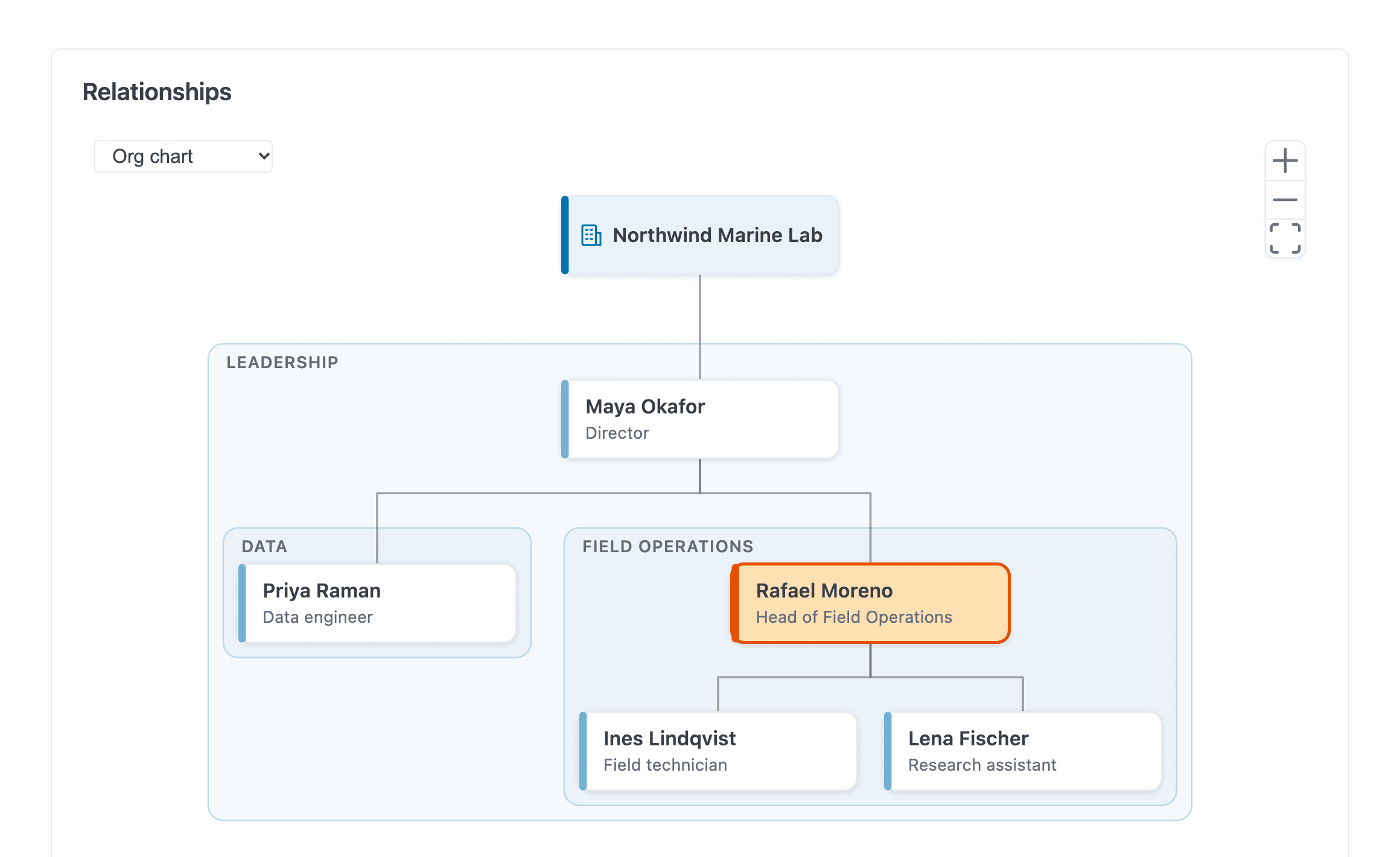
The org chart, grouped by department, with the current note highlighted.
- On an organization’s page the organization is the root and its employees hang beneath it, arranged by who reports to whom. Someone whose manager does not list the employer is still placed under that manager.
- On a person’s page you see their management chain up to the top (with the employer organization above it), their peers — others with the same manager — and their own reports two levels down.
- People are grouped into labelled boxes by their
department; a team made only of individual contributors is stacked into a compact column. - Assistants hang off the person they assist with a dotted line. Someone with
two managers is drawn under one and joined to the other with a dashed line
(on each manager’s own page, under that manager); their card shows a small
+1, and hovering it names the other manager. - Charts are capped at 80 people. Whatever does not fit becomes a +N more card; clicking it opens the page of the person those reports belong to, where they are drawn in full.
- Click a card to go to that note. Drag to pan, scroll or pinch to zoom; the fit-to-view button resets the view.
All people and All
These reuse the sidebar’s link graph, drawn in place at full size with labels,
pan/zoom and a depth stepper (starting at graph_depth, default 2).
Organizations are colored differently from people, with a legend.
All adds the current note’s ordinary links — notes it links to and notes linking to it — in a muted color with dashed edges. Only the current note’s links are added (they do not expand further), and they are fetched only when you pick this chart. If link tracking is off, the chart says so and shows relationships only.
Which relationships count as family or work
Every relationship type has an optional category (family, work, or your
own) and, for pairs like parent/child, a hierarchy (up or down) saying
which side ranks higher. The family charts draw only family types; the org
chart only hierarchical work types; the graphs draw everything. See
Relationships for the built-in types and how to configure
your own.
If your relationship_types predate category and hierarchy, the charts
fall back sensibly: the built-in work types (reports_to, manages,
assistant, assists, employer, employee, colleague) are treated as
work and everything else as family, and pairs are oriented the way they always
were. Add hierarchy to a custom pair such as manager/report to make it
draw the right way up.
Searching contacts
Search (/ or Ctrl+K/Cmd+K) matches any frontmatter field with
field:value, which covers most contact lookups:
| Query | Finds |
|---|---|
type:person | Every person note |
company:acme | People whose company contains “acme” — including company: "[[Acme Corp]]" |
department:design | Everyone in a department |
job_title:engineer | Everyone whose title contains “engineer” |
type:person jane | People matching “jane” |
Matching is case-insensitive and by substring. Put a value containing spaces in
double quotes: type:"Meeting Notes".
In server and GUI mode the search panel adds two shortcuts:
- Note types — the scope menu (All / Titles & Tags / Content) lists every
typeused in your notes, with counts, below a separator. Choosing one writes the matchingtype:filter into the search box, replacing any previous one, and the menu goes back to showing the scope. - Folder picker — the folder button next to Current folder only opens
a filterable list of every folder that holds notes. Pick one (arrow keys and
Enter, or click) to search only there; the option then reads Only in: /people/. Unchecking it searches everywhere again.
On a person’s page, Current folder only searches the folder the note is in
(/people/ for /people/jane/), not the note itself.
Data problems
An entry mbr cannot read — a map with two keys where one label: value pair
belongs, a list nested inside a list, a date without a label — is skipped, and
the rest of the card still renders. In server/GUI mode it is listed in the
page-problems panel as an unreadable contact field, naming the field. See
Configuration → Per-page error indicator.
Compatibility with address books
Each field corresponds to a standard address-book field, so contacts can be synchronized without losing structure.
| mbr field | vCard 4 (RFC 6350/6474) | Apple CNContact | Google People API |
|---|---|---|---|
type: person / organization | KIND:individual / KIND:org | contactType | — |
title | FN | (composed) | names.displayName |
prefix | N honorific prefix | namePrefix | names.honorificPrefix |
first_name | N given | givenName | names.givenName |
middle_name | N additional | middleName | names.middleName |
last_name | N family | familyName | names.familyName |
suffix | N honorific suffix | nameSuffix | names.honorificSuffix |
aliases (nickname: or bare) | NICKNAME | nickname | nicknames |
aliases (maiden_name:) | X-MAIDENNAME | previousFamilyName | nicknames (type MAIDEN_NAME) |
company | ORG | organizationName | organizations.name |
department | ORG (unit) | departmentName | organizations.department |
job_title | TITLE | jobTitle | organizations.title |
image | PHOTO | imageData | photos |
gender | GENDER | — | genders |
emails | EMAIL;TYPE=… | emailAddresses | emailAddresses |
phones | TEL;TYPE=… | phoneNumbers | phoneNumbers |
urls | URL | urlAddresses | urls |
social | X-SOCIALPROFILE | socialProfiles | urls (type profile) |
im | IMPP | instantMessageAddresses | imClients |
addresses | ADR;TYPE=… | postalAddresses | addresses |
dates.birthday | BDAY (year optional: --0319) | birthday | birthdays |
dates.anniversary | ANNIVERSARY | dates (anniversary) | events (type anniversary) |
dates.death | DEATHDATE | dates (custom label) | events (custom type) |
other dates.* | X- property | dates (custom label) | events (custom type) |
born_place / died_place | BIRTHPLACE / DEATHPLACE | — | — |
relationships | RELATED;TYPE=… | contactRelations | relations |