Relationships & Genealogy
mbr tracks two kinds of connections between notes:
- Content links — ordinary markdown links (
[text](url)), tracked as inbound/outbound “backlinks”. These say that two notes are connected. - Typed relationships — named, directed edges declared in YAML frontmatter.
These say what connects two notes (a
parent, aspouse, asibling…), and can carry their own attributes (marriage dates, places, notes).
The driving example is genealogy: each note is a person, edges are
parent / child / spouse / sibling, birth/death dates live on the person
notes, and marriage/divorce dates live on the relationship.
Typed relationships are on by default and cost nothing when unused. Disable them
with relationship_tracking = false (or --no-relationship-tracking).
Why
I use markdown to track everything. Lately my wife has been into genealogy, but uses various sites and one offline program to track things. I just don’t believe these will all be around in ten years and I certainly don’t want to pay subscription fees for that time.
To me, a family tree is more about stories than names and dates, which makes markdown notes perfect. We can track structure between them (something we already do anyway) and visualize that structure, but otherwise, they’re just notes. This also gives a chance to double own on alignment with OKF allowing notes to be used for more than just prose. It’s a test case for prose with optional structures.
We’ll see where this goes, but really this note type could be used for other things, too, like tracking contacts. Which would allow linking to referenced people and having their contact info at my fingertips. This seems so much better than my current system that intermingles people from different places and contexts.
The type field
Notes may declare a first-class, self-descriptive type (like slides):
---
type: person
title: John Doe
---
Unknown types are tolerated — type is a plain string that flows through
frontmatter unchanged and is exposed to templates and site.json.
Person fields
A type: person (or type: organization) note is a contact: mbr renders a
full-width contact card at the top of the page from its frontmatter. The full
field list — names, company, phones, emails, addresses, labeled dates — is in
Contacts; the ones that matter most for genealogy are:
| Field | Type | Purpose |
|---|---|---|
dates | map of label → date | birthday, death, anniversary, or any label of your own. Partial dates are fine: 1927-03-19, 1927-03, 1927, or a yearless 03-19. Shown humanized on the card (March 19, 1927, March 19). |
born / died | date/string | Deprecated but supported spellings of dates.birthday / dates.death (the dates entry wins if both are present). |
born_place / died_place | string | Shown next to the birthday / death date. |
image | path or URL | Portrait on the card (relative paths resolve from the note’s folder). |
gender | string | Styles the genealogy charts and tints the card’s default avatar (e.g. male, female); any value is accepted. |
aliases | list | Alternate and maiden names, optionally labeled (see below). |
---
type: person
title: Mary Doe
dates:
  birthday: 1927-03-19
  death: 2010-08-05
born_place: "Boulder, CO"
gender: female
image: /people/mary.jpg
aliases:
  - maiden_name: Mary Smith
  - "Mrs. John Doe"
relationships:
  - type: spouse
    to: "[[John Doe]]"
---
In site.json every person and organization carries its dates as
dates.<label> strings, with legacy born/died folded into
dates.birthday/dates.death, so charts and custom components read one shape.
The label is lowercased (Birthday: is published as dates.birthday), since
labels are matched without regard to case.
Aliases
aliases lists alternate names for a person — most usefully maiden names and
married names. Entries may be bare names or one-key label: name maps, mixed
freely; the label only affects how the contact card phrases it
(maiden_name: Mary Smith reads née Mary Smith). A single name may be written
as a plain string (aliases: Bob). Every name, labeled or not, does two things:
- Endpoint resolution. A relationship endpoint that names an alias — written
as a
[[Wikilink]]or a path — resolves to this note, exactly like itstitleor filename stem. So a parent can point achildedge atto: "[[Mary Smith]]"(her maiden name) even though her note is titled Mary Doe, and it still links up. - Search. Aliases are searchable, so looking up a maiden name finds the person.
Resolution order is title → alias → filename stem (all case-insensitive). As with titles, an ambiguous name shared by multiple notes resolves deterministically to the note with the lexicographically smallest URL.
All of these fields are optional; a person note with none of them behaves exactly as before.
The relationships field
Relationships are a single generic array of edge objects, so the same mechanism works for any domain (genealogy is just one). The in-browser editor has a relationship builder that picks the type and the note for you and reads each edge back as a sentence; see Editing Properties.
---
type: person
title: John Doe
born: 1925-06-02          # node attribute on the person — ordinary frontmatter
died: 1999-11-20
relationships:
  - type: spouse           # required predicate
    to: "[[Mary Smith]]"   # endpoint
    married: 1948-06-01    # arbitrary edge attributes, preserved verbatim
    place: "Denver, CO"
  - type: child
    to: "[[Alice Doe]]"    # "Alice is my child"
  - type: parent
    to: "[[George Doe]]"   # "George is my parent"
---
Endpoints and direction
Each edge connects a subject and an object:
to:names the object. Whenfromis omitted the subject defaults to the current note, sotype: X, to: [[Y]]reads “Y is my X”.from:names the subject. Whentois omitted the object defaults to the current note, sotype: X, from: [[Y]]reads “I am Y’s X”.- If both are present, the edge connects two other notes (useful for authoring a graph from a single index note).
- If neither is present, the edge is skipped with a warning.
For genealogy the most natural form is to: from each person’s own note:
- type: parent
  to: "[[Sam Doe]]"     # Sam is my parent  → I show up under Sam's Children
- type: child
  to: "[[Alice Doe]]"   # Alice is my child → I show up under Alice's Parents
Endpoint values
Endpoints may be:
- A
[[Wikilink]]— resolved by note title first, then by filename stem (case-insensitive).[[Target|Alias]]is supported (the target is used for resolution). - A path — absolute (
/people/john.md) or relative (../john.md), resolved the same way markdown links are.
If an endpoint can’t be resolved, the raw string is kept for display and a warning is emitted — a broken relationship never fails a render or build. Ambiguous names (two notes with the same title) resolve deterministically to the note with the lexicographically smallest URL, and mbr now tells you when it had to make that choice — see Data problems mbr reports.
Body [[Wikilinks]] in page text resolve the same global way as relationship
endpoints: the current folder is preferred, otherwise the first matching note in
any folder (by title, alias, then filename stem) is used.
Reserved keys and attributes
On each edge object, type, to, from, and label are reserved. Every
other key is a free-form edge attribute, preserved verbatim (dates, places,
notes, numbers, booleans…) and shown in the info panel and exposed as JSON.
Automatic reverse edges
You declare each edge once; the reverse is derived automatically, exactly
like backlink derivation. This is driven by the relationship_types registry,
which classifies each type as:
- symmetric — the reverse reads the same (
spouse,sibling). - inverse pair — the reverse reads as the paired type (
parent↔child). - directed (anything not listed) — still tracked and visible from both sides, but not relabelled.
So if George’s note declares type: child, to: [[John Doe]] (“John is my
child”), then:
- George’s note shows John under Children.
- John’s note shows George under Parents (derived, no editing needed).
Reciprocal declarations are de-duplicated: if John also declares
type: parent, to: [[George Doe]], both sides collapse to the same single edge.
The built-in defaults cover family and work:
| name | inverse | symmetric | hierarchy | category |
|---|---|---|---|---|
parent | child | up | family | |
child | parent | down | family | |
spouse | yes | family | ||
sibling | yes | family | ||
reports_to | manages | up | work | |
manages | reports_to | down | work | |
assistant | assists | down | work | |
assists | assistant | up | work | |
employer | employee | up | work | |
employee | employer | down | work | |
colleague | yes | work |
Two fields describe how a type draws:
hierarchy(up/down) is read from the declaring note’s side:upmeans the note you point to ranks above you —type: reports_to, to: "[[Sam Lee]]"makes Sam your manager. The charts orient edges by it, so a custom pair likementor/menteedraws the right way up.categorygroups types for the charts: the family chart and timeline usefamilyedges, the org chart usesworkedges.
Set them on one half of an inverse pair and the other half inherits the flipped direction and the same category. If both halves claim the same direction, mbr keeps the one declared first, flips the other and logs a warning.
A person’s company: "[[Acme Corp]]" also creates an employer edge to that
note (shown on both ends as derived) — see
Contacts → Company links.
Note: setting
relationship_typesreplaces the defaults wholesale — the types above are not merged in. To add your own, copy the defaults you still want and append:relationship_types = [ { name = "parent", inverse = "child", hierarchy = "up", category = "family", label_plural = "Parents" }, { name = "child", inverse = "parent", hierarchy = "down", category = "family", label_plural = "Children" }, { name = "spouse", symmetric = true, category = "family" }, { name = "sibling", symmetric = true, category = "family" }, { name = "reports_to", inverse = "manages", hierarchy = "up", category = "work", label = "Reports to", label_plural = "Reports to" }, { name = "assistant", inverse = "assists", hierarchy = "down", category = "work" }, { name = "employer", inverse = "employee", hierarchy = "up", category = "work" }, { name = "colleague", symmetric = true, category = "work" }, # your own: { name = "mentor", inverse = "mentee", hierarchy = "up", category = "work" }, ](Inverse halves such as
managesare auto-registered from their partner, as described next; spell them out only to change their labels.) The full list with labels is in the Configuration Reference.
Declaring one half of an inverse pair
You only need to declare one half of an inverse pair. Given
relationship_types = [
    { name = "manager", inverse = "report" },
]
mbr auto-registers the missing report type with inverse = "manager" and an
auto-derived label (“Report” / “Reports”), so both sides relabel correctly and
reciprocal declarations still collapse to a single edge. Declare the other half
explicitly only when you want custom labels or an irregular plural:
relationship_types = [
    { name = "manager", inverse = "report", label_plural = "Managers" },
    { name = "report", inverse = "manager", label = "Direct report" },
]
Explicit declarations always win over auto-registration. If the two halves
disagree (manager names report as its inverse, but report names something
else), both are kept exactly as written and a warning is logged naming both —
one direction will not be relabelled as you expect. A type declared as both
symmetric and inverse keeps its symmetric meaning; the inverse is ignored
with a warning.
Genealogy walkthrough
A three-generation family, one note per person, each edge declared once:
# people/george.md
---
type: person
title: George Doe
born: 1898-02-11
relationships:
  - type: spouse
    to: "[[Martha Doe]]"
    married: 1920-04-10
  - type: child
    to: "[[John Doe]]"
  - type: child
    to: "[[Robert Doe]]"
---
# people/john.md
---
type: person
title: John Doe
born: 1925-06-02
relationships:
  - type: spouse
    to: "[[Mary Smith]]"
    married: 1948-06-01
    place: "Denver, CO"
  - type: sibling
    to: "[[Robert Doe]]"
  - type: child
    to: "[[Alice Doe]]"
  - type: child
    to: "[[Sam Doe]]"
---
Even though Sam’s note declares no relationships, opening it shows his
parents (John, Mary) and his sibling (Alice) — all derived from edges declared
elsewhere. Open the info panel (Ctrl+g) to see relationships grouped by
predicate, with edge attributes like married 1948-06-01 · place Denver, CO.
On a type: person or type: organization note the same rows also appear on
the contact card.
How it’s exposed
links.json(per page, loaded by the info panel): arelationshipsarray of resolved edges alongsideinbound/outboundlinks.site.json: a top-levelrelationship_typesregistry, plus arelationshipsarray on eachmarkdown_filesentry (resolved URLs included), so downstream tooling can consume the whole graph.
Each resolved relationship includes: rel_type (as declared), predicate
(viewpoint label used for grouping), neighbor (resolved URL, empty if
unresolved), neighbor_title, neighbor_raw, resolved, direction
(outgoing/incoming), optional label, attributes, and derived (true
when produced by the reverse-edge rule rather than declared on this note).
Visualizing relationships
mbr ships two complementary visualizations. Both are lazy-loaded (they cost nothing until used) and both work identically in server, GUI, and static-build modes:
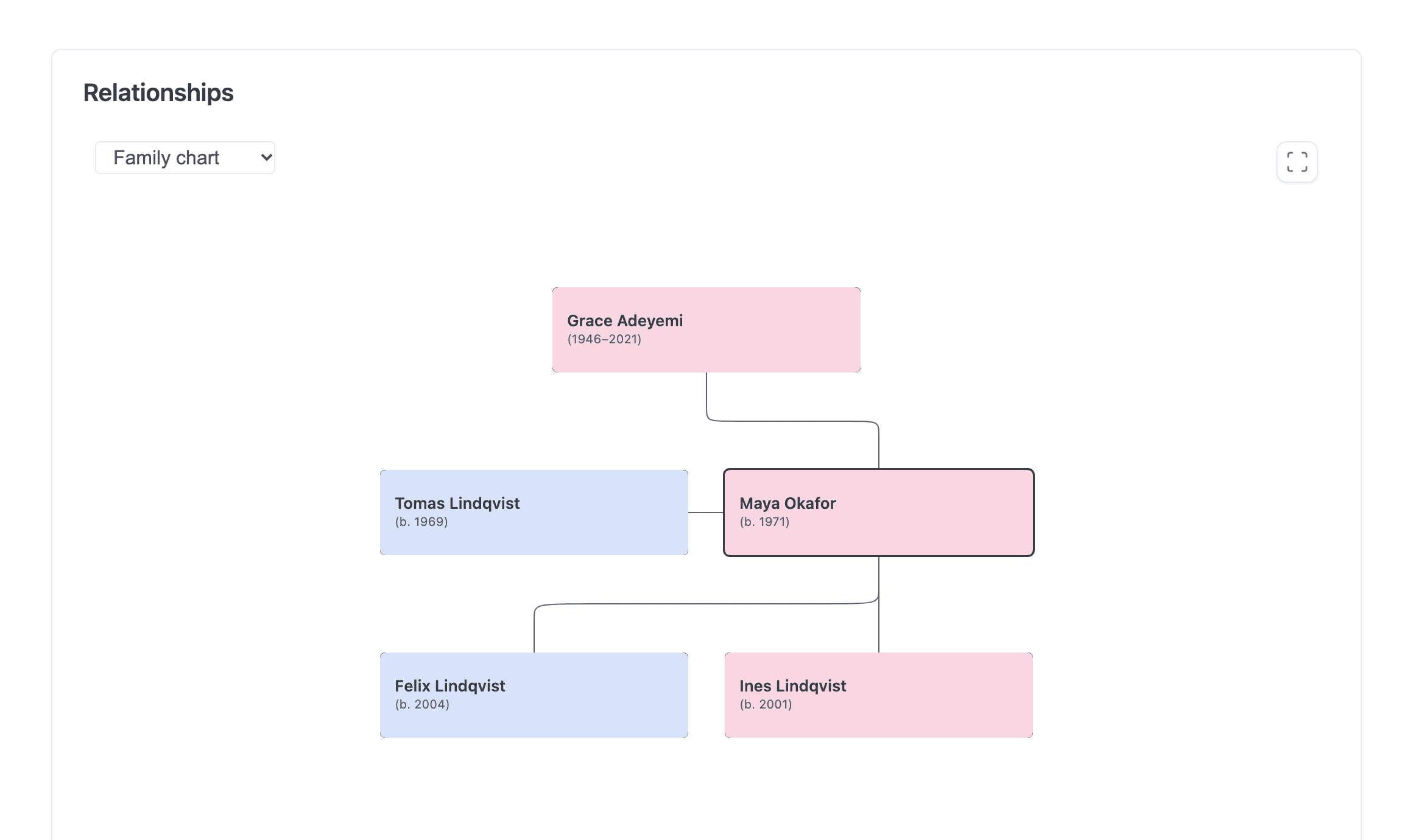
The family chart drawn from parent, child and spouse relationships.
- Relationship charts — interactive family, timeline, org and graph charts
rendered inline on
type: personandtype: organizationpages. - Link graph in the sidebar — a force-directed mini graph of the current note’s neighbourhood (content links and typed relationships), shown at the top of the info panel on every note.
Breaking change: the old mermaid-based
<mbr-relationships>element has been removed. A custom.mbr/_display_enhancements.htmloverride that still references it silently renders nothing (unknown elements are inert), and itsdepth/max-nodesattributes are superseded by thegraph_depthconfig option and the new elements. Mermaid diagrams in ordinary code blocks are unaffected.
Relationship charts on person and organization pages
Notes with type: person or type: organization render a Relationships
panel — the <mbr-genealogy> web component (the name predates the other
charts), emitted by _display_enhancements.html below the note body. It draws
from the resolved relationships in site.json and renders nothing when the
note has no resolved relationship to another note, so a
note without edges never produces an empty box.
A selector in the top-left corner switches between five charts — Family
chart, Timeline tree, Org chart, All people and All; the
choice persists in localStorage (mbr_genealogy_chart) and is used whenever it
fits the note. The family charts draw only relationship types whose category
is family. The org chart and the two graphs are described in
Contacts → Charts; the two family views are:
Family chart — built on the family-chart library (ISC license):
- SVG person cards with portraits from the
imagefrontmatter field. - Shows ancestors and descendants two generations each around the current person.
- Expand/collapse of non-blood branches via per-card mini-tree and link-break toggles.
- Native pan/zoom; clicking a card navigates to that person; the fit-to-view button recenters.
Timeline tree — a custom time-aware layout:
- Ancestors above, descendants below the current person (two generations each).
- A year axis on the left positions each person by birth year
(
dates.birthday, or the olderborn; a month-day date like--03-19has no year and is ignored). People without a birth year fall back to their generation’s median year, then to estimated 28-year generations; if no one has dates the axis is hidden. - Lines are colored by parent — blue father-lines, pink mother-lines
(gray when
genderis unknown) — and couples are joined by marriage bars. - Pan, zoom, and click-to-navigate as above.
The chart JS is a lazy chunk (/.mbr/components/mbr-genealogy.min.js, ~239 kB
min / ~71 kB gz). Person pages prefetch it, but it loads and renders only when
the chart scrolls near the viewport, so it never blocks page render. The two
graph charts reuse the sidebar’s mbr-graph.min.js chunk, loaded only when one
of them is chosen.
Roadmap: the chart selector is designed for additional chart types — a bubble map of birth places, hierarchical edge bundling across all notes, and an ancestors/descendants sunburst are planned.
When the charts appear
The inline charts appear only on type: person and type: organization notes
that have at least one resolved relationship. Notes with other type values
(type: character, type: service, …) get no inline chart — their typed
relationships appear in
the sidebar link graph (below) and in the info panel’s textual
Relationships section instead.
To gate the chart differently or place it elsewhere, override
.mbr/_display_enhancements.html in your repository:
<!-- .mbr/_display_enhancements.html -->
{% if type and (type == "person" or type == "organization") %}<mbr-genealogy></mbr-genealogy>{% endif %}
Link graph in the sidebar
The info panel (Ctrl+g / Cmd+g) shows a force-directed mini graph at
the top: the current note plus its neighbourhood of inbound links, outbound
internal links, and typed relationships. It appears on any note that has a
links.json — not just typed notes — so it doubles as a visual backlink map.
- Nodes are colored by degree: the focus note uses the theme’s primary color, and 1st-, 2nd-, … degree neighbours step down a ramp of the same hue.
- Hovering a node shows a card with the note’s title and description (desktop only); clicking navigates; dragging repositions.
- The expand button opens a full-screen view with pan/zoom, node labels, and a
depth stepper (
1–5) to widen or narrow the neighbourhood on the fly.
The default depth comes from the graph_depth config option (default 2,
valid 1–5, env MBR_GRAPH_DEPTH).
The graph is assembled client-side by a breadth-first walk over each
neighbour’s per-page links.json (about 4 fetches in flight at a time, capped
at 80 nodes, cached for the session). Because it needs no dedicated server
endpoint, it works identically in static builds. In server mode, mbr
additionally bounds concurrent inbound-link repository scans so a burst of
links.json requests can’t stampede the server.
The graph JS is a lazy chunk (/.mbr/components/mbr-graph.min.js, d3-force,
~57 kB min / ~19 kB gz) loaded only when the info panel first opens. If link
tracking is disabled (--no-link-tracking / link_tracking = false), there is
no links.json and the graph section simply doesn’t appear.
Data problems mbr reports
Relationship data goes wrong quietly: nothing 404s, nothing fails the build, and
the note just renders with the wrong family. mbr detects the following and
reports each one twice — once as a WARN line when the index is built (both
mbr -s and mbr -b), and once on the affected page itself in the
page-problems panel, which is server/GUI only. Static builds are never
changed by any of this.
Relationship cycles
A parent/child chain that loops back on itself — “A is B’s parent, B is A’s
parent”, or any longer ring. This cannot be true of a real family tree, and it
is actively harmful: the genealogy chart walks the hierarchy and a cycle makes it
unrenderable. mbr reports the loop with every note in it:
WARN relationship cycle over `child`: /people/ada/ -> /people/bob/ -> /people/ada/
     — each note is the previous note's `child`, which cannot be true in a
     hierarchy (nobody is their own ancestor). ...
Open any note named in the chain and remove or correct the offending edge. Only
hierarchical types are checked — the halves of an inverse pair like
parent/child or employer/employee. Symmetric types (spouse, sibling)
and untyped edges cycle legitimately and are never reported.
The most common way to create one by accident is an ambiguous name (below) attaching an edge to the wrong namesake.
Ambiguous names
Two notes answering to one name — a John Doe Sr and a John Doe Jr, a maiden name
that is also someone else’s title. mbr resolves these first-wins (smallest URL)
and always has; what is new is that it says so, for both relationship endpoints
and body [[Wikilinks]].
Both appear in the page-problems panel. Relationship endpoints additionally warn at startup, because a relationship is declared in a note’s frontmatter and mbr reads every one of them while indexing:
WARN ambiguous relationship endpoint name `[[john doe]]`: resolved to
     /people/john-jr/; also matched by /people/john-sr/. mbr always picks the
     first — rename a note, give it a distinguishing `aliases:` entry, or name
     the file explicitly to choose
Wikilinks are reported only on the page containing the link, never in the
log. Two notes sharing a name is not itself a problem — a link written through
that name is — and the index has no way to know which shared names anything
links to. It also cannot know the answer: wikilinks resolve current-folder
first, so [[Sam]] next to a Sam.md is unambiguous however many other Sams
the repository holds, and elsewhere it resolves to a different note entirely.
Which one you got depends on the page, so that is where it is reported.
To disambiguate, pick any of:
- Give the notes distinct titles (
title: John Doe Sr). - Add an
aliases:entry that is unique to one of them and reference that. - Name the file explicitly instead of using a name:
to: people/john-sr.md. A path endpoint is never ambiguous.
A relationship-endpoint problem is reported on the note that declared the endpoint; a wikilink problem on the page that contains the link. Namesakes that merely share a name and declare nothing are not flagged.
Genealogy repositories can have dozens of shared names, so the startup log shows at most 20 individual endpoint warnings followed by a one-line summary of the rest. The page-problems panel is never truncated — each page always lists all of its own.
Frontmatter parse errors
A single YAML mistake discards the entire frontmatter block, not just the bad
line: type: person, born, aliases and every relationships entry vanish at
once. A duplicated key is the easy one to write by hand:
relationships:
  - type: parent
    to: "[[Mary Doe]]"
    to: "[[Sam Doe]]"   # second `to:` — the whole block is now discarded
(Use two separate list entries.) The warning names the file:
WARN Failed to parse YAML frontmatter: String("to"): duplicated key in mapping
     at byte 117 line 8 column 9; the whole frontmatter block (including any
     `aliases` and `relationships`) is ignored for this note
     path=/notes/people/john.md
Watch for this when other notes suddenly report unresolved endpoints: if a note
loses its aliases, every note that referred to it by an alias stops resolving,
so one parse error can look like a dozen unrelated broken relationships.
Configuration
No configuration is needed — reporting is always on and adds no options. It
follows the feature it describes: --no-relationship-tracking turns off
relationship tracking and its reports along with it, and the page-problems panel
as a whole is gated on link tracking.
| Option | Type | Default | Description |
|---|---|---|---|
relationship_tracking | bool | true | Enable typed relationship tracking |
relationship_types | array | family + work defaults | Relation types and their semantics, hierarchy, category and labels |
graph_depth | number | 2 | Default neighbourhood depth (1–5) for the sidebar link graph (env MBR_GRAPH_DEPTH) |
CLI: --no-relationship-tracking disables the feature for a single run. See the
Configuration Reference and
CLI Reference.