Static Site Generation
Build mode generates a complete static website that can be deployed to any hosting platform.
Basic Usage
# Build to ./build/ directory
mbr -b /path/to/notes

# Build to custom directory
mbr -b --output ./public /path/to/notes
Build Process
flowchart LR
    SCAN[Scan Repository] --> RENDER[Render Markdown]
    RENDER --> SECTIONS[Generate Sections]
    SECTIONS --> ASSETS[Symlink Assets]
    ASSETS --> INDEX[Pagefind Index]
    INDEX --> LINKS[Validate Links]
    LINKS --> OUTPUT[build/]
1. Scan Repository
mbr scans all markdown files, extracting:
- File paths and names
- YAML frontmatter metadata
- Directory structure
2. Render Markdown
Each markdown file becomes an HTML page:
README.md→README/index.htmldocs/guide.md→docs/guide/index.html
3. Generate Section Pages
Directories get index pages listing their contents:
- Files with titles and descriptions
- Subdirectory links
- Breadcrumb navigation
4. Place Assets
Static assets (images, PDFs, videos) are symlinked rather than copied:
build/images/ → ../images/
A folder symlinked in from outside the repository (static/videos -> ~/Movies)
is a read-only mount: its files are placed exactly like the repository’s own
assets, so links to them pass --fail-on-broken-links, and links to refused
targets (/, $HOME, a directory containing the repository, a hidden
directory) are skipped with a warning. Hidden files are never published, from
the repository, the static folder or a mount; .well-known is the one
exception. See
Symlinked folders.
Note: Symlinking is used on macOS and Linux. On Windows, assets are copied instead, because creating symlinks there requires Developer Mode or an elevated process. Builds work the same either way, but on Windows the output directory is as large as your assets rather than nearly empty. If you are publishing the
build/directory, note that symlinks must be dereferenced when archiving (for exampletar -h) whereas copies need no special handling.
5. Pagefind Index
mbr generates a Pagefind search index:
build/.mbr/pagefind/
├── pagefind.js
├── pagefind-ui.js
├── pagefind-ui.css
└── *.pf_*  # Index files
Search works entirely client-side with no server required.
6. Validate Links
mbr checks every <a href> in the generated HTML and reports the ones a reader
cannot follow:
⚠️  Broken links detected (3 total):
   docs/guide/index.html → ../missing/ (no such page or file)
   docs/guide/index.html → ../../folder/file (points at a page but has no trailing slash (breaks that page's relative links))
   docs/guide/index.html → ../../../../escape/ (escapes the site root)
The three reasons are genuinely different problems:
| Reason | What is wrong |
|---|---|
no such page or file | Nothing in the output answers this URL. |
points at a page but has no trailing slash | The page is there, so the link appears to work — but pages live at directory-style URLs, and without the slash the browser resolves that page’s own relative links one directory too high. The damage lands on the next click. A static host has no redirect to repair it (server mode does — see Server Mode). |
escapes the site root | A ../ chain climbed above the site root. Browsers silently discard the excess (RFC 3986 §5.2.4), so the reader lands on an unrelated page instead of seeing an error. |
Frontmatter Parse Errors
While rendering, mbr also reports any pages whose YAML frontmatter fails to
parse. A parse failure discards the entire frontmatter block (so otherwise
valid fields like title: or type: slides are silently lost), which is why
it is surfaced explicitly:
⚠️  Frontmatter parse errors (1 total):
   /presentations/talk/ → while parsing a block mapping, did not find expected key
A common cause is using tabs or * list markers instead of spaces and - in a
YAML list. In server/GUI mode these same errors appear in the per-page problems
panel (the ⚠ indicator in the navigation bar).
Output Structure
build/
├── index.html              # Home page
├── README/
│   └── index.html          # README.md rendered
├── docs/
│   ├── index.html          # Directory listing
│   └── guide/
│       └── index.html      # docs/guide.md
├── images/ → ../images     # Symlinked assets
└── .mbr/
    ├── site.json           # Site metadata
    ├── theme.css           # Styling
    ├── pagefind/           # Search index
    └── *.js                # Components
Deployment
GitHub Pages
See Integration for a complete GitHub Actions workflow.
Quick setup:
- Build:
mbr -b --output ./docs /path/to/notes - Enable GitHub Pages in repository settings
- Select
/docsfolder as source
Netlify
# netlify.toml
[build]
  publish = "build"
  command = "mbr -b ."
Any Static Host
The build/ folder contains plain HTML/CSS/JS that works anywhere:
- Amazon S3 + CloudFront
- Cloudflare Pages
- Vercel
- Firebase Hosting
- Any web server (nginx, Apache)
Search Configuration
Pagefind search is automatically configured and works out of the box.
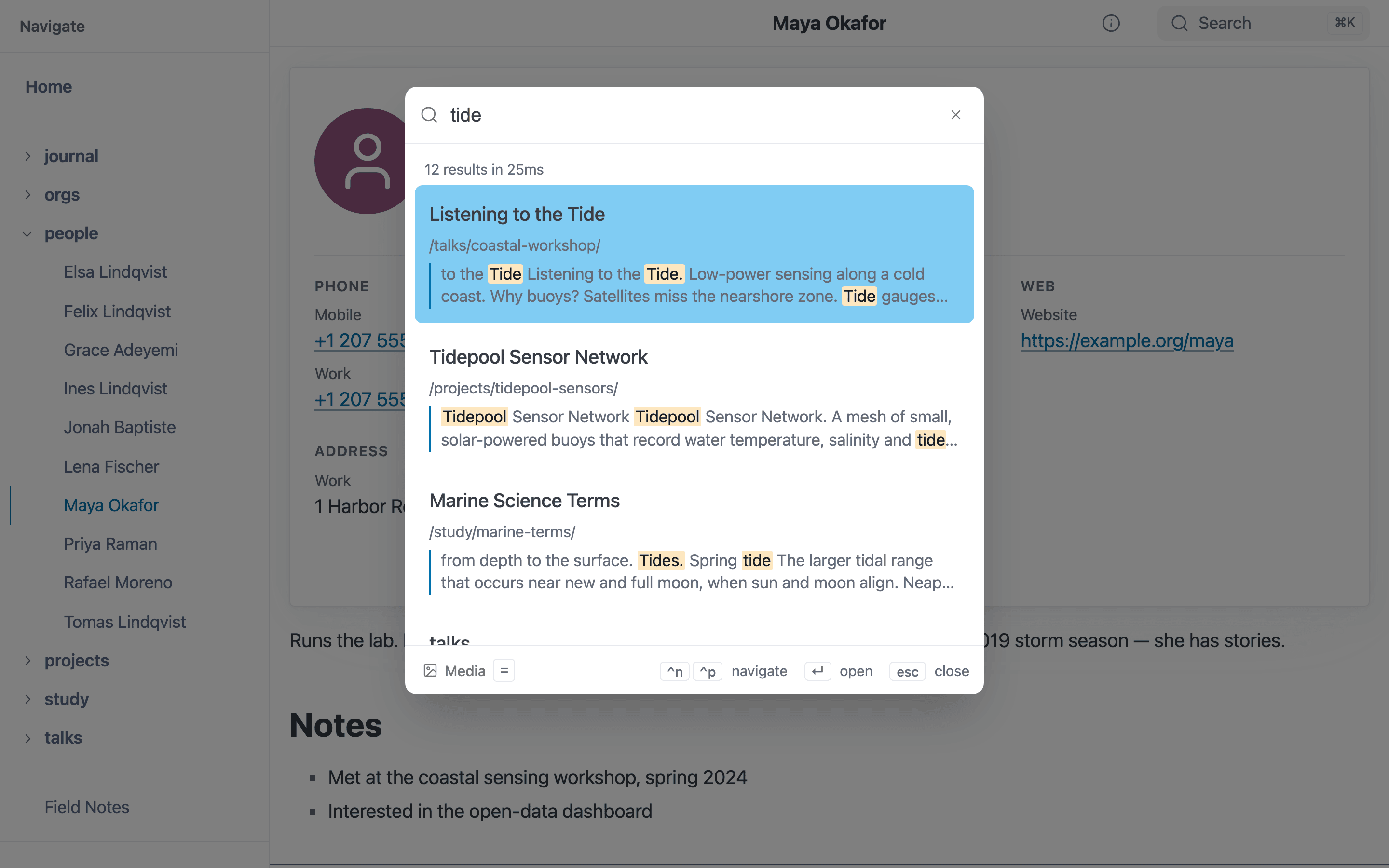
Search in a static build, powered by the Pagefind index generated at build time.
Search Features
- Instant results: Searches as you type
- Fuzzy matching: Finds close matches
- Heading navigation: Results link to specific sections
- Mobile friendly: Works on all devices
Customizing Search
Pagefind respects data attributes in your HTML. Advanced customization is available through Pagefind’s configuration options.
Build Performance
mbr is optimized for fast builds:
- Parallel rendering with Tokio
- Efficient file scanning with rayon
- Symlinks instead of copies for assets
Typical performance:
- ~100 files: < 1 second
- ~1,000 files: 2-5 seconds
- ~10,000 files: 10-30 seconds
Incremental Builds
mbr does not currently support incremental builds. Each build regenerates all files.
For faster iteration during development, use server mode (mbr -s) instead.
Troubleshooting
Windows Output Is Larger Than Expected
On Windows, assets are copied into the output directory rather than symlinked
(symlink creation requires Developer Mode or an elevated process). A repository
with large images or video will therefore produce a correspondingly large
build/ directory. To get symlink behavior, build under WSL instead:
# In WSL
mbr -b /mnt/c/Users/you/notes
Broken Links Reported
If mbr reports broken links:
- Check that the target file exists
- Verify the link path is correct (case-sensitive on Linux)
- Ensure the file has a recognized markdown extension
- For “no trailing slash”, write the link as
page.md,page/or[[Page]]rather than as a hand-written<a href="/page">— mbr’s own transform always emits the canonical form - For “escapes the site root”, count the
../segments: a link authored indocs/guide.mdresolves relative todocs/, so../../xalready leaves the repository
Links to mbr’s own media viewers — /.mbr/videos/?path=… and the pdfs,
audio and images siblings, with or without the trailing slash — are exempt
from link checking. They are addressed by their path= query rather than by a
file in the output, so there is nothing for the checker to look for. A
/.mbr/… link with no path= query is still checked.
Large Asset Files
For repositories with large assets (videos, etc.):
- Assets are symlinked, not copied
- Deployment may need to handle symlinks specially
- Consider using a CDN for large media files
Build Output Too Large
If the build output is unexpectedly large:
- Check for accidentally included directories
- Use
ignore_dirsin configuration - Verify symlinks are being created (not copies)